




Mar 2024
11


To purchase about a Live Group Policy Class (Public or Private), or the Group Policy Health Check, please call Jeremy at 302-351-8408 or email register[[att]]moskowitz-inc.com
Get serious, and perform “Best Practices” around Group Policy management. Take back control and get your IT life back!
| Dates | Class | Actions |
|---|---|---|
| No Public Classes Scheduled | ||
Call if you have 3 or more people to help us get started! In the meantime, click here to checkout our Online Class
The web browser today has literally become the default app in this era of the cloud and spurred the growth of browser extensions. Browser extensions provide a convenient way to customize and enhance a user’s web browsing experience with added functionalities and features directly within the browser. However, just as you don’t want users utilizing certain applications on corporate devices, you might want to restrict certain browser extensions for reasons of security, compliancy, content control, productivity, and performance. For instance, you may not want users installing a VPN extension to get around your web filtering. Fortunately, there are a couple of ways to achieve this.
Using the Microsoft Intune Admin Center go to Devices > Configuration and create a new profile. Choose Windows 10 and later as the platform and Administrative Templates as the Profile type. Assign a name to the profile and then navigate to User Configuration > Microsoft Edge > Extensions and then enable “Control which extensions cannot be installed” and input the extension names you want to filter out. You can look up extension names on the Internet. An example is shown below.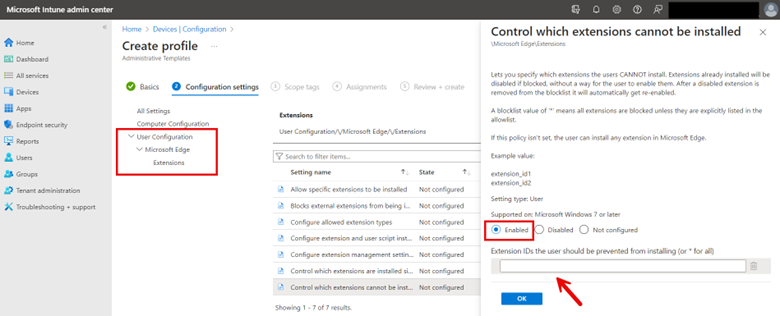
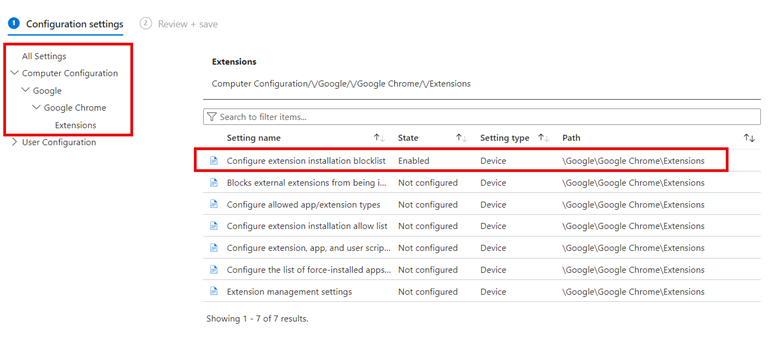
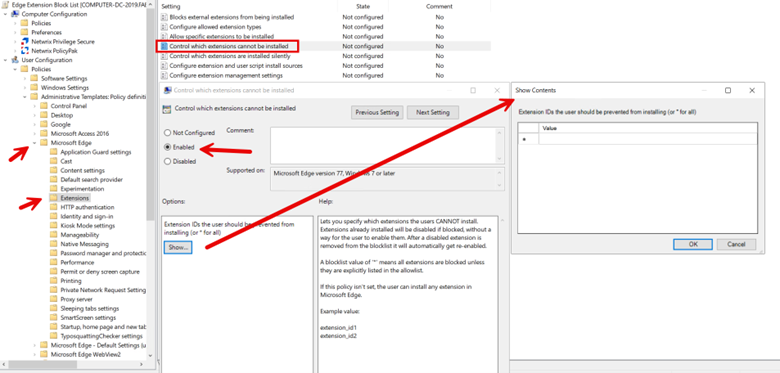
Then assign the profile to the designated groups and complete the wizard. You can also apply Edge browser extension restriction on the Computer side. In the example below, I have configured a block list for the Chrome browser.
Windows Copilot is a feature designed to enhance user productivity and support through AI-powered assistance directly within the Windows operating system. It offers real-time suggestions, automates tasks, and provides contextual help based on user actions and behaviors. By integrating deeply with Windows, Copilot simplifies navigation, streamlines workflows, and helps users efficiently manage their tasks, making technology more accessible and intuitive for everyone.
Think of Copilot as a specialized variant of ChatGPT, seamlessly integrated into the Windows operating system to provide real-time assistance, task automation, and contextual support directly from the desktop environment. Despite its clear advantages, there are potential concerns that an organization might have:
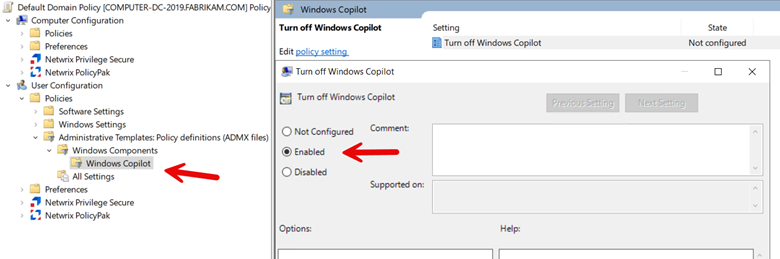
To restrict user access to Windows Copilot, create a GPO using Group Policy Management and then navigate to Computer > Administrative Templates > Windows Components > Windows CoPilot and enabe “Turn off Windows Copilot” as shown in the screenshot below.
While Intune currently lacks a direct menu option for configuring Windows Copilot, but it can be administered through OMA-URI settings. The essential settings required are as follows:
OMA-URI Path: ./User/Vendor/MSFT/Policy/Config/WindowsAI/TurnOffWindowsCopilot
Data type: Integer
Value: 1
Complete the profile by adding any desired scope tags and assign the profile to your designated groups and finish the wizard.
In the past, group policy administrators focused on limiting standard users' access to various sections of the Windows Control Panel. Today, while controlling access to the Control Panel remains important, it's equally crucial to restrict access to the Windows Settings app. This approach is driven by several key objectives:
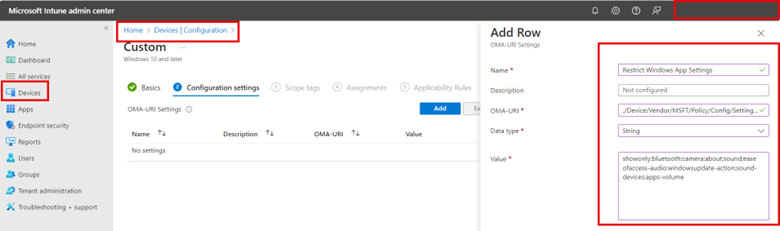
One way to approach this is rather than creating an Intune policy that restricts access to specific ms-settings, you use an allow list approach that only allows access to a specific list of settings. To do so using the Microsoft Intune Admin Center go to Devices > Configuration and click “Create” to make a new profile. Choose Windows 10 and later as the Platform and Custom Templates as the Profile type.
Using custom templates, assign the profile a name and apply the following OMA-URI settings:
OMA-URI: `./Device/Vendor/MSFT/Policy/Config/Settings/PageVisibilityList`
Data type: String
For the String value, type showonly: and list each msi-setting you want immediately after the colon. Separate each msi-setting with a semicolon like this:
showonly:bluetooth;camera;about;sound;easeofaccess-audio;windowsupdate-action;workplace-provisioning;sound-devices;apps-volume;privacy-webcam
The screenshot below shows the process using Intune:
Complete the profile by adding any desired scope tags and assign the profile to your designated groups and finish the wizard.
You can find a complete list of ms-settings names on the Microsoft website.
Conditional Access policies in Microsoft Intune are designed to enhance security by ensuring that only authorized users under specific conditions can access your organization's applications and services. These policies are a critical component of a zero-trust security model, which assumes breach and verifies each request as though it originates from an uncontrolled network. Conditional Access Policies are a potent security mechanism, yet they require careful management to avoid inadvertently locking out individual users including yourself, or even the entire organization.
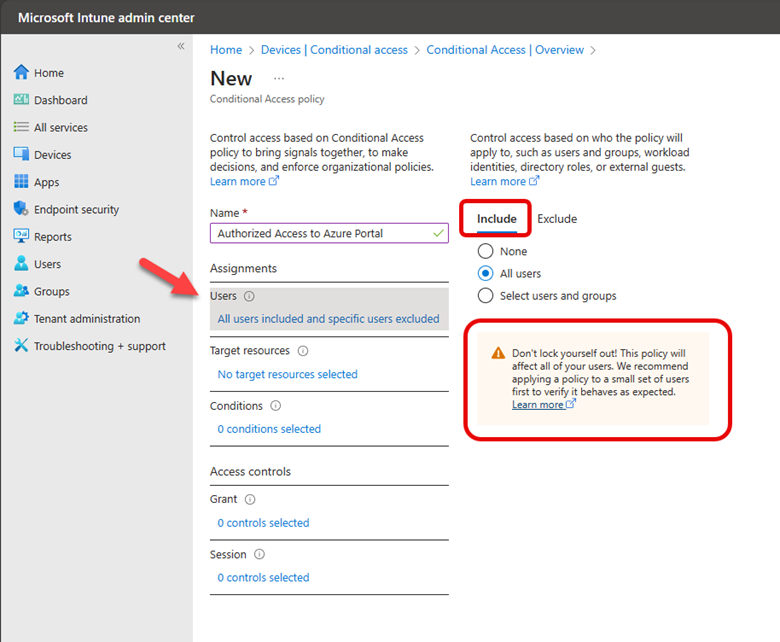
Let’s say you have all your users and computers contained within Azure Active Directory and you want to create a conditional access policy that restricts access to the Azure AD portal for only Azure administrators or other privileged users that require access to perform their job duties. To create a conditional access policy using the Microsoft Intune Admin Center you navigate to Devices > Conditional Access and create a new policy.
The default action of this policy will be to block access by default to the Azure AD portal. Thus, under “Include” I have selected All users. Note the warning directly underneath this selection that cautions me about locking myself out as the policy will apply to all users, even the person creating the policy and all high privilege administrators.
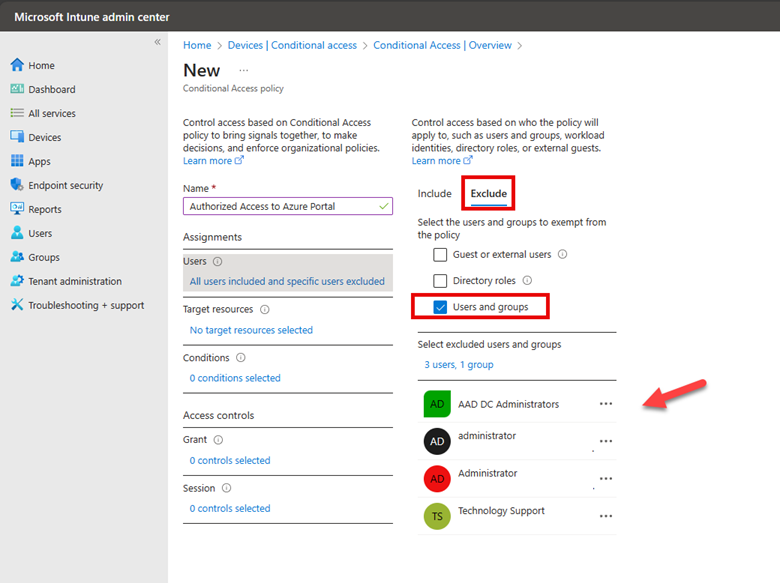
Thus, it is imperative that I assign groups that will be excluded from the default action. As shown in the screenshot below, I have selected an assembly of users and groups to exclude.
The next step is to select a Target Resource. The target resource refers to the applications, services, or data that the policy will protect. These resources are what the policy conditions apply to, determining how and when users can access them based on specific criteria such as user identity, device compliance, location, and risk level. Target resources can include cloud applications, which in this case is Windows Azure Service Management as shown below.
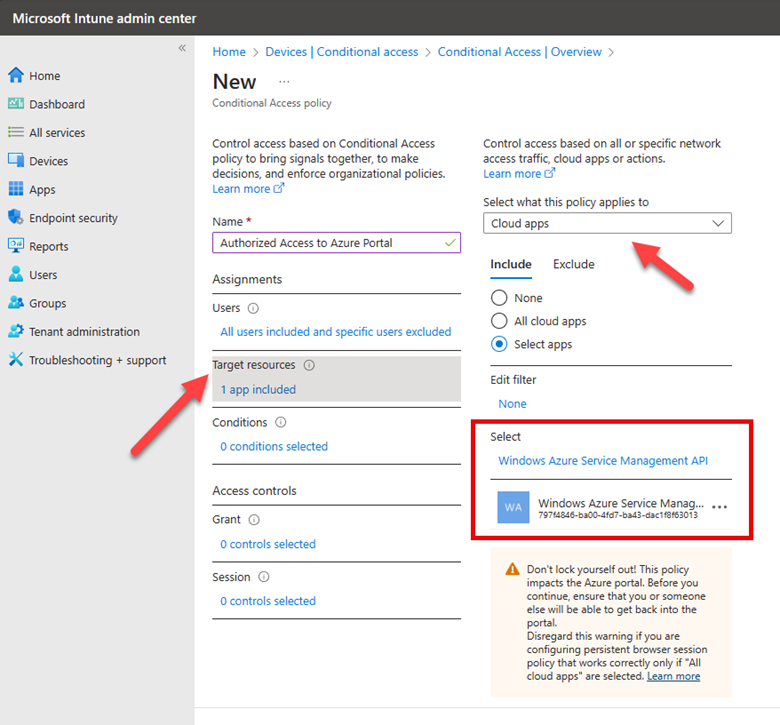
For this policy, I will not set any conditions, such as location or device platform, because I intend to block access irrespective of these factors. The final step is to specify what action will be granted to the Azure portal. Here I am going to block access for all users except for those specifically excluded from this policy. Since I have yet to exclude my own account or any group that includes my account, Intune is providing a final warning, cautioning that the policy I'm about to implement will prevent me from accessing the Azure portal.
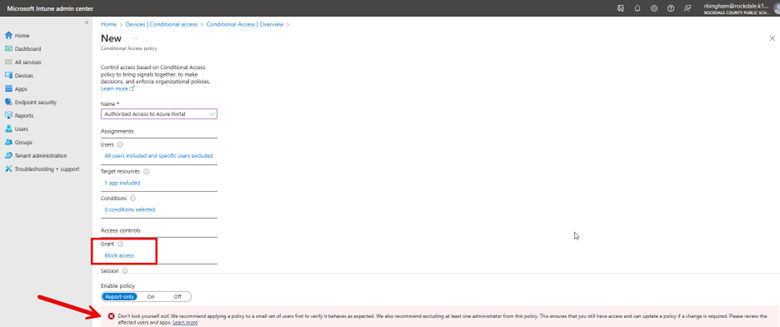
Conditional Access policies are a powerful tool to enforce least privilege access to your critical resources. However, caution is necessary, as a single unintended click could lead to adverse outcomes.
After taking Jeremy’s Group Policy Class, my staff and I were able to reduce the number of help desk calls dramatically! Thank you Jeremy!
MCSE Systems Administrator, Royal Canin USA, Inc
If you want to learn everything about Group Policy, then you need to attend Jeremy’s training class, I came in as a novice and left an expert. Jeremy speaks to you, not above you.
Desktop Computing Specialist, Princeton University
Jeremy is absolutely the best presenter and instructor I have seen. I really would like to get the same type of instruction for other IT courses. He has a wonderful way of sharing his knowledge in a simple, effective way that leaves you thinking “Wow! That makes so much sense. ” After taking his “Group Policy Online University” courses and reading his books I feel like a pro — truly understanding Group Policy. And whenever I have a question, Jeremy is always there to help. I really liked the fact you can review the online course TWICE. It’s almost like getting TWO courses in one. Add in his weekly tips and simply you can’t go wrong. Thanks Jeremy — and your staff for creating a great learning experience that I benefit from every day.
Network Administrator, Mondial Assistance
I used the tools he demonstrated and those tools saved me a lot of time and money.
Senior Network Engineer, County of Orange, CA
After hearing Jeremy speak, I was immediately able to confidently use GPMC, and successfully deploy many GPO’s which have saved my sanity and added years to my life. Having a copy of Jeremy’s Group Policy, Profiles, and IntelliMirror book on hand has given me instant access to many of those “How does this work in the real world?” questions. Thanks Jeremy, You are awesome!
Lead Systems Administrator
After taking Jeremy’s class, I was able to create and troubleshoot Group Policy in our environment. Others tried to convince me that the “Microsoft Standard” is to have one huge policy, but troubleshooting that policy for them was a nightmare. After they saw how easy it was to create smaller, less complicated policies, troubleshooting became a piece of cake.
Server Administrator, University of Toledo
I was able to apply some of the Group Policy best practices that I had not already implemented. I am also looking forward to implementing the many new Vista/W2K8 GPOs.
Sr. Systems Administrator, Adventist Health Systems
I sincerely enjoyed the class in Boston and I learned a lot. Within two work days of coming back I had a major update to a core product piece of software that, because of your class, I knew to ask for an MSI file for the update and how to properly create a GPO to distribute to the appropriate users and make it do an install without interaction or granting them administrator rights. When they logged in this morning the update applied beautifully. This one process alone has made the whole class worth it to me. With the many other things I learned and will also put to use in the near future and I am extremely happy. Thanks again for coming to Boston.
Tech Support Specialist, Fidelity Bank
After listening to Jeremy, I felt much more confident in working with Group Policy and using it for many benefits in our Organization. The book was a great supplement, too.
Manager, IT Operations, Miller-Valentine Group
Jeremy has a way of explaining things that are down to earth. He takes a potentially dry subject and makes it more fun. These Group Policy courses are invaluable to help me in my job. As we transition to new machines and new operating systems, I can use the information and tools learned in class immediately. The pre-built virtual lab machines made it so I could focus on the labs right away. The hands-on labs are awesome! I am really glad I signed up for Jeremy’s online courses–even though I ended up taking them on my own after work. It was a really good investment.
ATK Launch Systems